

Smarter rolling forecasts for manufacturers—Inside Salesforce with Valorx Wave
Why your S&OP process feels broken (even when everyone’s trying).
Every Monday's S&OP call starts the same: Sales brings pipeline risk, Operations shares weekly capacity, Finance asks for drawdowns—and someone is holding a file called Q4_Forecast_v7_FINAL(2).xlsx. By the time everyone aligns on a number, the week has already moved on.
This guide explains why rolling forecasts break down in manufacturing environments—and how to fix planning drift without abandoning Salesforce or forcing planners to give up spreadsheets. Over 60% of manufacturers still reconcile forecasts manually across disconnected systems, losing an average of 8 hours per week to version control alone. For operations leaders, FP&A teams, and RevOps professionals managing weekly S&OP cycles, this creates a critical gap: planning quietly leaves Salesforce and splinters into multiple versions across email threads and shared drives.
The issue isn't effort. It's that when planning happens outside Salesforce, versions drift, variance vs. plan appears late, and review meetings become reconciliation sessions instead of decision-making forums. You'll discover how to keep planning where data, governance, and history already live—inside Salesforce—while maintaining the familiar spreadsheet experience planners depend on.
The problem: When planning leaves Salesforce
Manufacturers run on a weekly cadence. As weeks roll forward, teams pass spreadsheets for drawdowns, partner forecasts, and pipeline exports. The pattern is predictable:
Monday: Export Sales Agreement schedules from Salesforce
Tuesday: Email partner CSVs, merge with pipeline data
Wednesday: Reconcile SKU names, fix region codes, rebuild formulas
Thursday: Distribute Q4_Forecast_v6.xlsx to stakeholders
Friday: Receive edits from three teams—now you have v6, v6_Sales, v6_OpsRevised
Monday: Start over with version control chaos
When planning happens outside Salesforce, three things break:
- Versions drift. No one knows which file is current.
- Variance appears late. Finance sees committed vs. actual after the week closes.
- Meetings become reconciliation. Teams spend 40 minutes aligning numbers, 20 minutes making decisions.
The fix isn't another template. It's keeping planning where data, governance, and history already live—inside Salesforce—without asking planners to give up the spreadsheet experience.
The solution: Keep the spreadsheet experience—inside Salesforce
Valorx Wave is a spreadsheet-style, time-phased planning grid that runs natively in Salesforce Lightning enabling fast, time-based planning and seamless data operations. (Take a product tour below)
With Valorx Wave, instead of exporting data to Excel, planners work in a familiar grid interface built on Manufacturing Cloud objects—Sales Agreements, Product Schedules, and Opportunities—without ever leaving Salesforce.
Here's how it works:
- Launch Wave from any Salesforce record (Sales Agreement, Account, Opportunity)
- Edit in a grid view (SKU × Plant × Week, committed vs. actual, remaining commitment)
- Review changes in a pre-commit changeset
- Commit to Salesforce with one click—creating an auditable trail using standard Salesforce audit features
You can also pull in Opportunities and partner orders if those live in Salesforce.
Nothing is exported or re-keyed, and nothing bypasses security. Profiles, permission sets, field-level security, and sharing apply as usual because Wave operates within Salesforce’s controls.
Planners still work in a grid. IT still owns the logic. Leadership finally sees one source of truth.
If your planning logic already lives in Salesforce Reports, Wave can map those reports so filters and groupings stay consistent.
For a deeper look at how grid maps are configured—fields from multiple objects, read/write rules, defaults, sorting, and pivots—this short tutorial walks through it step by step.

What changes when rolling forecasts stay in Salesforce
| Before: The Spreadsheet Export Path | After: The Inside Salesforce Path |
|---|---|
|
1
Account manager exports Sales Agreement schedules to Excel.
2
Merges partner CSV (fixing SKU mismatches and region codes).
3
Emails Q4_Forecast_v5.xlsx to Finance and Operations.
4
Finance makes edits, saves as v5_Finance.xlsx.
5
Operations makes different edits, saves as v5_Ops.xlsx.
6
Monday S&OP call: 40 minutes reconciling versions before decisions start.
|
1
Account manager opens Sales Agreement in Lightning and clicks Open in Wave.
2
Matrix grid loads planned and actual product schedules by week (with plant/region dimensions).
3
Edits inline: re-phase delivery weeks, rebalance regions, add notes.
4
Reviews changeset and commits directly to Salesforce.
5
Finance refreshes their view—sees the same change instantly, no attachments, no version chasing.
6
Monday S&OP call: 10 minutes reviewing changes, 50 minutes making decisions.
|
The only change is where planning happens. Same S&OP cadence. Same people in the room. Planning stays on-platform.
Telescoping forecasts—keep weekly buckets current automatically
Most teams waste 2-3 hours each week manually shifting their forecast windows: drop last week, add next week, rebuild formulas, redistribute to the team.
Wave automates this.
Each week, the Wave Matrix keeps the planning window current automatically: the weekly time columns advance, last week is dropped, and the next week is added—so no one has to manually adjust timeframes or rebuild the layout.
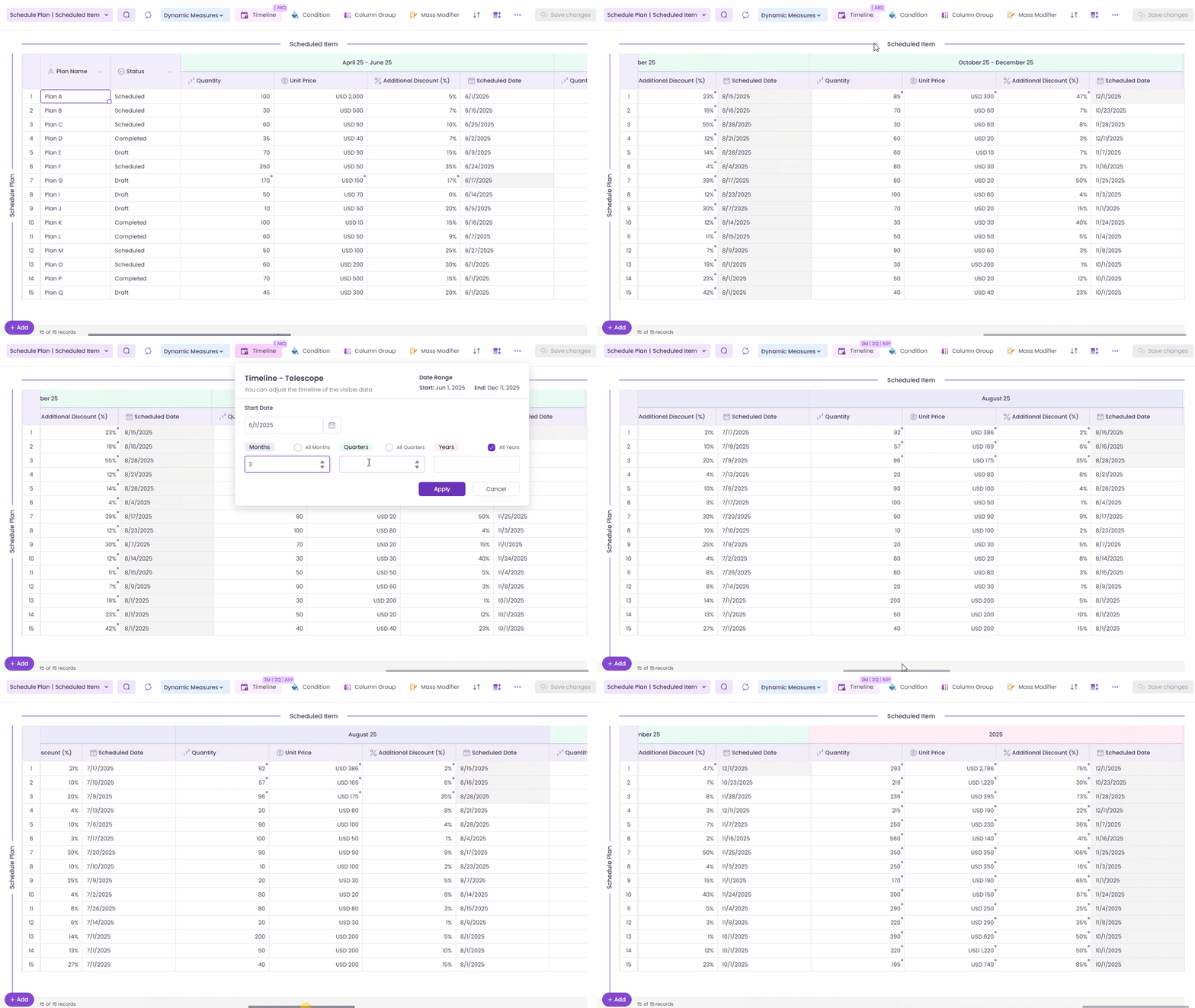
Your template logic and validations move with the shift. Planners edit inline, run pre-save validation, and Commit, so the forecast updates at business speed instead of spreadsheet maintenance. Capacity fields, service-level targets, and guardrails remain visible while you plan, keeping reviews focused on decisions—not mechanics.
Power your forecasts with sales agreements
Most manufacturers anchor revenue plans around Sales Agreements with planned vs. actual quantities over time; actuals can be derived from orders or imported from CRM systems.
In Wave, the drawdown conversation is record-centric, not spreadsheet-centric.
- Open a Sales Agreement in Lightning
- Launch Wave - the grid shows Committed vs. Actual with Remaining Commitment and variance % in plain sight.
- Re-phase weeks, rebalance plants/regions, adjust quantities
- Add notes for context
- Review changeset, commit and keep the trail tidy.
Every edit creates an auditable trail in Salesforce. Finance gets a complete record—who changed what, when, and why—without hunting through email threads or spreadsheet tabs.
Want guardrails? Use pre-save validations—e.g.:
- “No negative quantities”
- “Change ≤ ±X% unless approved”
- "Require reason code for any volume shift >1,000 units"
Wave blocks out-of-policy changes, prompts for a reason code, and only commits compliant edits. This makes every change auditable and keeps rogue adjustments out of the plan.
Dynamic demand planning: Unify pipeline, agreements, and partner inputs
Because Wave Embedded runs in Salesforce, planners can bring pipeline, agreements, and partner inputs into one governed grid.
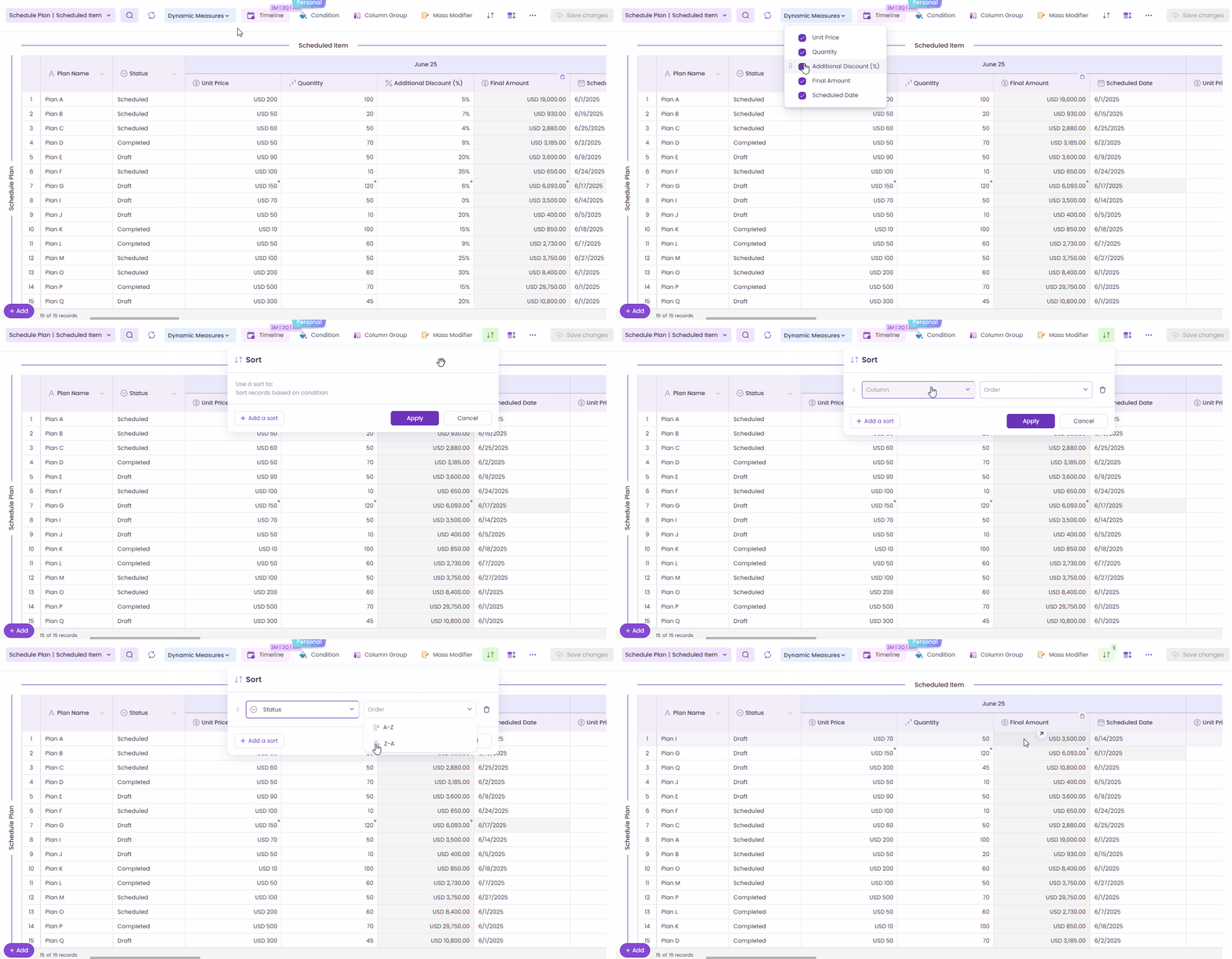
Example scenario:
- A major customer wants to pull an order forward from Q2 to Q1
- Regional operations needs to shift volume from Plant A to Plant B
- Finance wants to update pricing on a product line due to tariff changes
Instead of emailing three spreadsheets:
- Filter by region or product family in Wave
- Edit the affected weeks directly in the grid
- Add a short note for context
- Run pre-save validation (rule checks)
- Commit to Salesforce with an audit trail
Sales, operations, and finance all react to the same, up-to-date plan. If your org standardizes logic in Salesforce Reports, Wave maps to those reports so filters and groupings remain consistent across teams.
Stop cleaning up partner spreadsheets—pre-validate before import
Channel forecasts rarely arrive perfect. A partner might send a CSV with unfamiliar SKUs, a misspelled region, or a calendar that doesn’t match yours.
On average, teams spend 6-8 hours per week cleaning partner CSVs—reconciling SKU names, fixing region codes, aligning calendars—before the forecast can move forward.
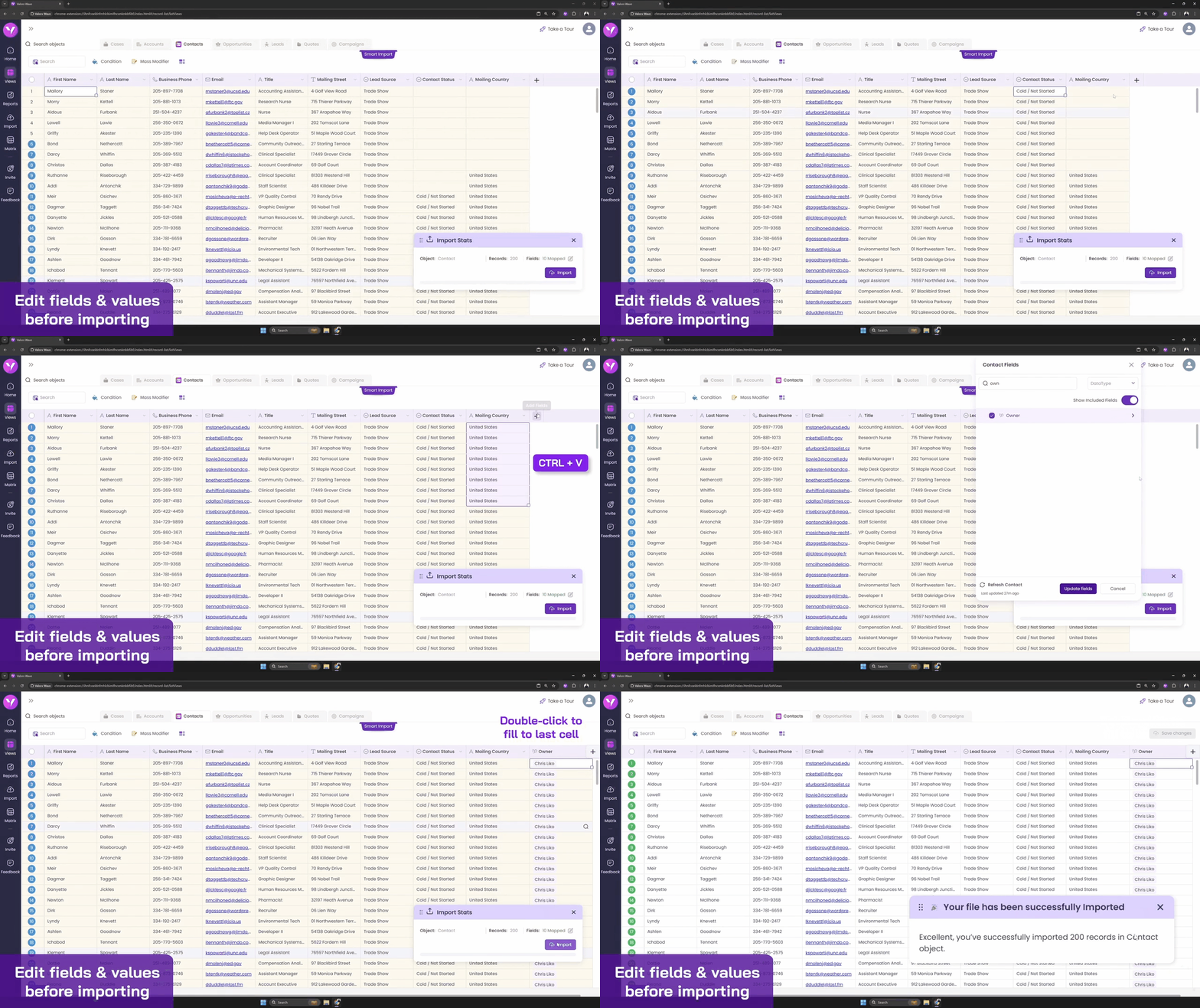
With Wave Smart Import, that file is loaded into Salesforce, not around it.
Wave runs import pre-validation against your product catalog, region list, and calendar:
- Flags rows that don't reconcile (unknown SKU, invalid region, date mismatch)
- Lets the owner correct or route them before anything is committed
- Flows good rows into Salesforce—rejects stay out, and it's all documented
Planners move faster. Admins stop playing janitor. Finance sees clean data from day one.
Forecast key accounts without leaving Salesforce
Strategic accounts often need a different planning lens:
- Product family instead of individual SKUs
- Region instead of plant-level detail
- Monthly horizons instead of weekly buckets
Wave lets you build a grid targeted at the Account; pull Opportunities, Agreement lines, and partner inputs together and plan at the horizon the team actually uses.
It’s still Salesforce. It’s still governed. It simply meets the account team where they work.
Example: A national distributor account with 12 regional buyers, 50+ SKUs, and quarterly commitments. Instead of stitching together 12 spreadsheets, the account manager opens the Account record, launches Wave, and sees:
- Committed quantities by region and quarter
- Pipeline opportunities mapped to product families
- Remaining capacity vs. historical run rates
- Notes from the last QBR
The account manager updates Q2 commitments based on the latest customer call, commits to Salesforce, and Finance sees the change in real-time.
Drive adoption with embedded, permission-aware templates where work lives
There’s a reason spreadsheet planning persists: people are used to it, and it has the functionality they need.
Wave doesn’t force users into forms. It meets them on the records they use with Global Grids (templates) you can publish by role/region/team.
Examples:
- Sales sees: Opportunity → Product → Week (editable pipeline)
- Operations sees: Sales Agreement → Product → Plant → Week (capacity vs. committed)
- Finance sees: Account → Product Family → Month (revenue plan vs. actuals)
- Regional leads see: Territory → SKU → Week (local demand signals)
Each template respects Salesforce security: profiles, permission sets, field-level security, and sharing rules. A regional manager in EMEA only sees EMEA accounts. A product planner can edit quantities but not pricing. IT controls the logic; users get the view they need.
Install via AppExchange (managed package) and follow your standard Sandbox → Production release path; upgrades follow normal Salesforce package processes.
Bottom line: You’re not switching tools—you’re moving the planning back into Salesforce where it belongs.
The Wave impact: faster replans, fewer surprises, better quality
When planning stays on-platform, three things improve immediately:
1. Faster Replans
- Before: 2-3 days to export, reconcile, and redistribute
- After: Same-day updates—edit, review, commit
2. Earlier Course-Corrections
- Before: Variance appears after month-close
- After: Real-time variance alerts during the planning window
3. Cleaner Data
- Before: Manual cleanup, rogue edits, version drift
- After: Pre-save validation blocks errors, report mapping keeps teams aligned
Review → Commit workflow ensures every change is intentional. Pre-save validations block out-of-policy edits. Report mapping keeps teams aligned on filters and groupings. Staying on-platform means one number everyone can stand behind.
If you’re comparing tools for in-Salesforce data management, Wave emphasizes editable report mapping, spreadsheet-style bulk edits, and embedded matrix views for multi-object, time-phased scenarios common in Manufacturing Cloud.

Stay true to Salesforce: security, reports, audit, and governance
Because Wave Embedded runs inside Salesforce, all your rules and governance still apply:
- Object models you recognize: Sales Agreements, Product Schedules, Opportunities, Accounts
- Reports you already maintain: Wave maps to Salesforce Reports—your filters become templates
- Profiles and permission sets you've built: Role-based access, read/write rules, field-level security
- Field-level security (FLS) you rely on: Users only see fields they're allowed to see
- Sharing rules that respect your org: Territory-based, account-based, team-based access
There's no side database. No hidden sync. No mystery logic.
Your admins remain in control. The pre-validation, report mapping, and review-and-commit features in Wave keep data clean and decisions auditable.
The outcome is simple: fewer surprises and one number everyone can stand behind.

Frequently asked questions
1. Why isn’t Excel alone enough for rolling forecasts?
Excel works well for modeling, but not for shared, weekly planning across teams. Version drift, manual merges, and late variance visibility are inevitable when spreadsheets become the system of record.
2. Do planners need to stop using spreadsheets?
No. The issue isn’t spreadsheets—it’s where they live. Keeping the spreadsheet experience inside Salesforce allows planners to work fast while maintaining a single source of truth.
3. Does Wave work with Manufacturing Cloud?
Yes. Wave is built specifically for Manufacturing Cloud use cases. It works natively with:
- Sales Agreements (commitment-based revenue plans)
- Sales Agreement Products (product-level details)
- Sales Agreement Product Schedules (planned and actual quantities over time)
- Opportunities (pipeline forecasts)
- Accounts (key account planning)
Wave respects Manufacturing Cloud data models, so your existing workflows, reports, and security rules continue to work.
4. Can Wave handle partner or channel forecasts?
Yes. Partner forecasts rarely arrive clean—CSV files often contain unfamiliar SKU names, misspelled region codes, or calendars that don't match yours.
5. How is Wave priced?
Check our pricing page here for further details.
Web-based CRM-Connectivity
Get started with Wave
Create a Valorx account and enjoy using Wave for free.