In native Salesforce
This would take hours of clicking, opening records, editing, saving, and navigating back to your list view—hoping you don't lose your place.


Looking for a GridBuddy Connect alternative? Whether you're concerned about the future of your current grid solution, frustrated with limitations, or simply want a more modern approach to Salesforce data management—this comprehensive comparison guide will help you make the right choice.
For Salesforce operations leaders evaluating GridBuddy alternatives and modern Salesforce grid solutions, here are the headline insights that matter:
For Salesforce-focused organizations, Valorx Wave Embedded delivers more features, faster performance, and lower cost than GridBuddy—without any risk to test and validate.
GridBuddy, now part of Validity’s product suite (acquired in 2019), established itself as one of the first tools to simplify Salesforce data management with editable, spreadsheet-style grids. Its core premise was powerful and straightforward: combine data from multiple Salesforce objects into a single editable view to eliminate time-consuming, record-by-record updates.
For Salesforce admins, operations teams, and sales reps who spent hours clicking through individual records, GridBuddy delivered a meaningful productivity boost—offering faster multi-record editing and centralized workspace layouts.
Despite GridBuddy's established presence in the market, a growing number of Salesforce teams are actively evaluating GridBuddy alternatives. Here's why:
When a product becomes part of a larger portfolio (as GridBuddy did when acquired by Validity), customers often worry about continued investment and innovation. Teams building long-term processes on a platform want confidence that the tool will evolve with their needs—not become a maintenance-mode afterthought.
GridBuddy's architecture includes both legacy and modern components. Some users report that customization often requires developer involvement, and the mobile experience remains limited. For organizations prioritizing agility and self-service administration, these constraints can become bottlenecks.
At approximately $24/user/month, GridBuddy represents a significant line item for larger teams. As organizations scrutinize their software spend, many are discovering alternatives that deliver comparable or superior functionality at lower price points.
Today's Salesforce power users expect features like intelligent import with auto-mapping, real-time error validation before data commits, native report editing, and sophisticated forecasting tools. Teams are increasingly seeking solutions purpose-built for modern workflows.
In practice, many Salesforce teams that have moved away from GridBuddy describe a consistent pattern of operational pain.
See what customers are saying on G2 reviews tell the story.
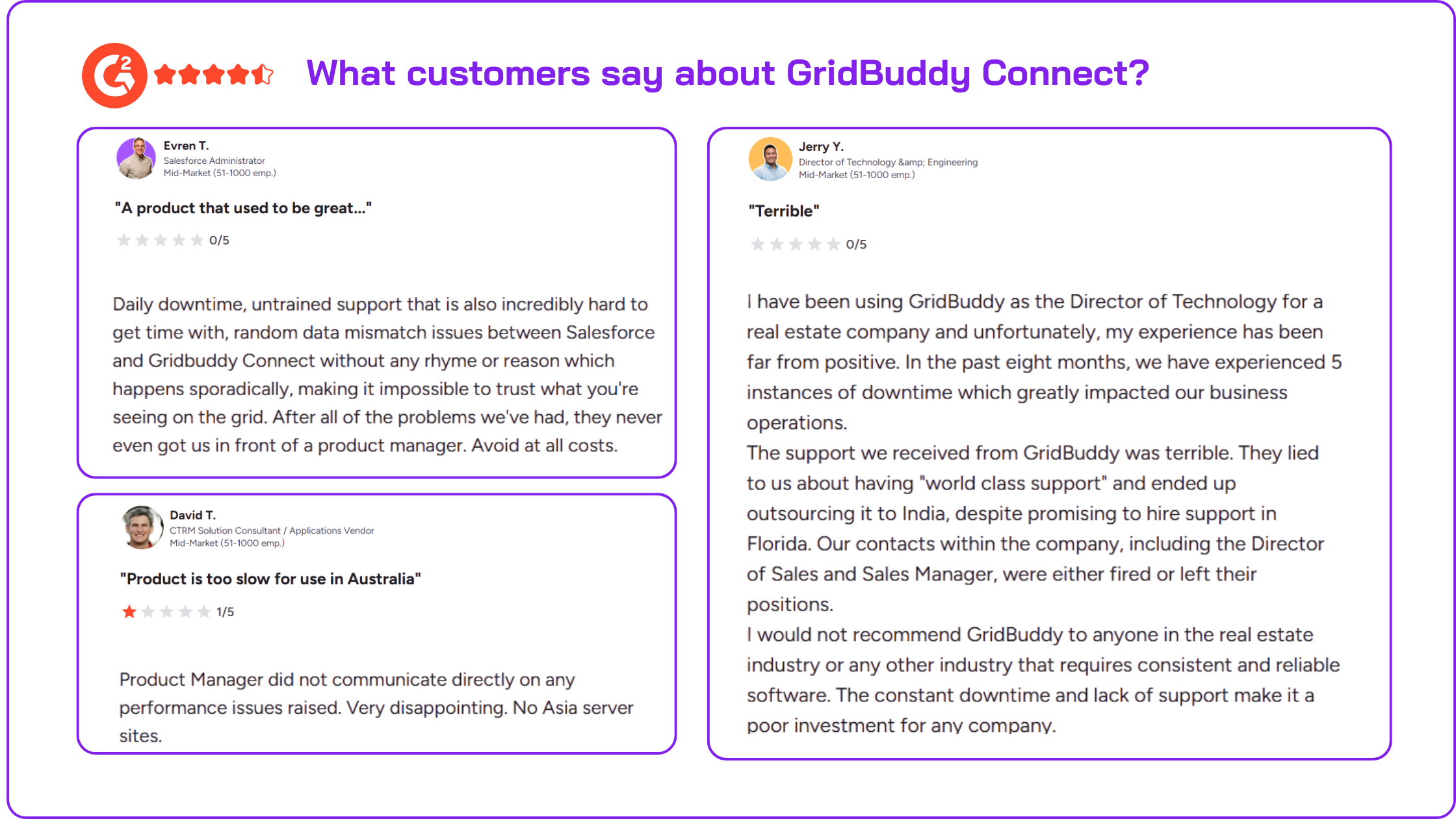
For teams managing thousands of records per cycle or hundreds of users in parallel, these pain points compound into measurable business risk:
Organizations outgrowing GridBuddy face a dual challenge: the tool lacks the modern capabilities and architectural flexibility needed for evolving workflows, while simultaneously delivering unreliable operational performance when managing large-scale data operations. Together, these factors create both strategic risk (investing in an aging platform) and tactical risk (depending on an unreliable tool for critical business processes).
Valorx Wave Embedded represents the next evolution in Salesforce data productivity tools. As a Salesforce-native application available on AppExchange, Wave Embedded delivers a familiar spreadsheet experience with capabilities that go far beyond basic grid functionality—all within your Salesforce environment.
Unlike browser-based workarounds, Wave Embedded is a managed package that installs directly into your Salesforce org. This means full integration with your existing security model, seamless user experience without context-switching, and enterprise-grade governance and controls.
Valorx Wave is trusted by enterprise organizations including Capital One, Toast, Wolters Kluwer, GE Healthcare, Experian, Columbia University, and School Specialty—demonstrating its ability to scale across diverse industries and complex use cases.

Wave Embedded runs entirely within Salesforce as a managed package. Your data never leaves Salesforce, all native validation rules and permissions are enforced, and admins maintain complete control over who can access and edit data. This is critical for organizations with strict data governance requirements.
When teams decide to move off GridBuddy, the first instinct is often to look for a like-for-like replacement: another grid-style add-on, a shinier UI, or a cheaper license.
The problem? Most of these alternatives only patch one part of the experience:
Valorx Wave Embedded is designed to solve the class of problems that show up across most GridBuddy-style tools—not just GridBuddy itself. Valorx Wave Embedded is designed to solve the class of problems that show up across most GridBuddy-style tools—not just GridBuddy itself:
Edit hundreds or thousands of Salesforce records in seconds—not minutes. Wave's bulk editing goes beyond basic inline updates with features like drag-and-fill, copy-paste operations, and mass modifier tools that mirror the spreadsheet experience users already know.
Handle unlimited records without the performance issues that plague other solutions.
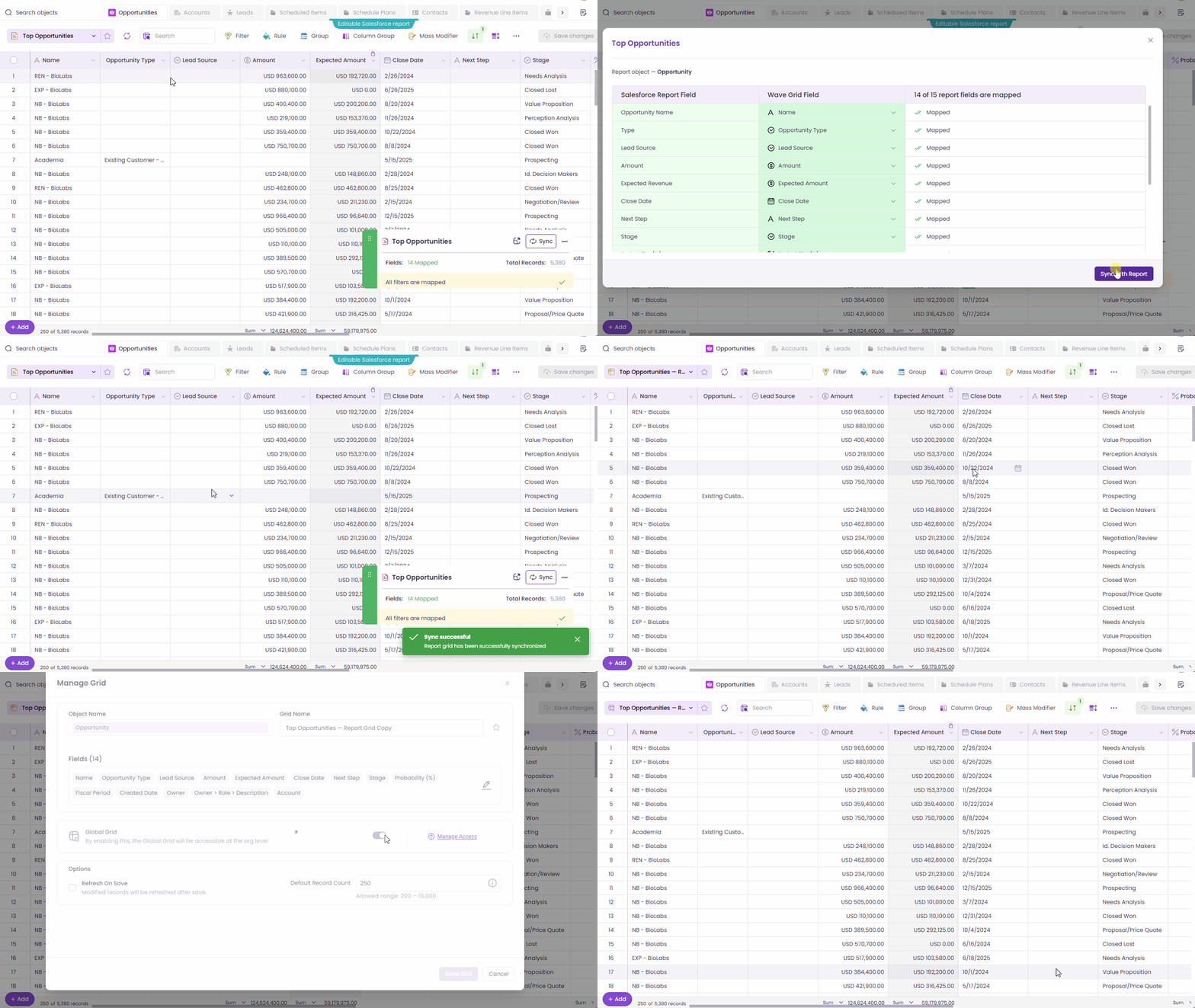
Here's something GridBuddy doesn't offer: Wave Embedded makes your existing Salesforce reports fully editable with 2-way sync. Start with any Salesforce report, and Wave automatically maps your fields and filters. Add more fields, bring in related objects, edit data inline, and save changes—all while bypassing the 2,000 record limitation that frustrates so many Salesforce users. Share these tailored report grids with your team for consistent, governed data access.
Steps to convert a mapped report to a custom grid and share globally:
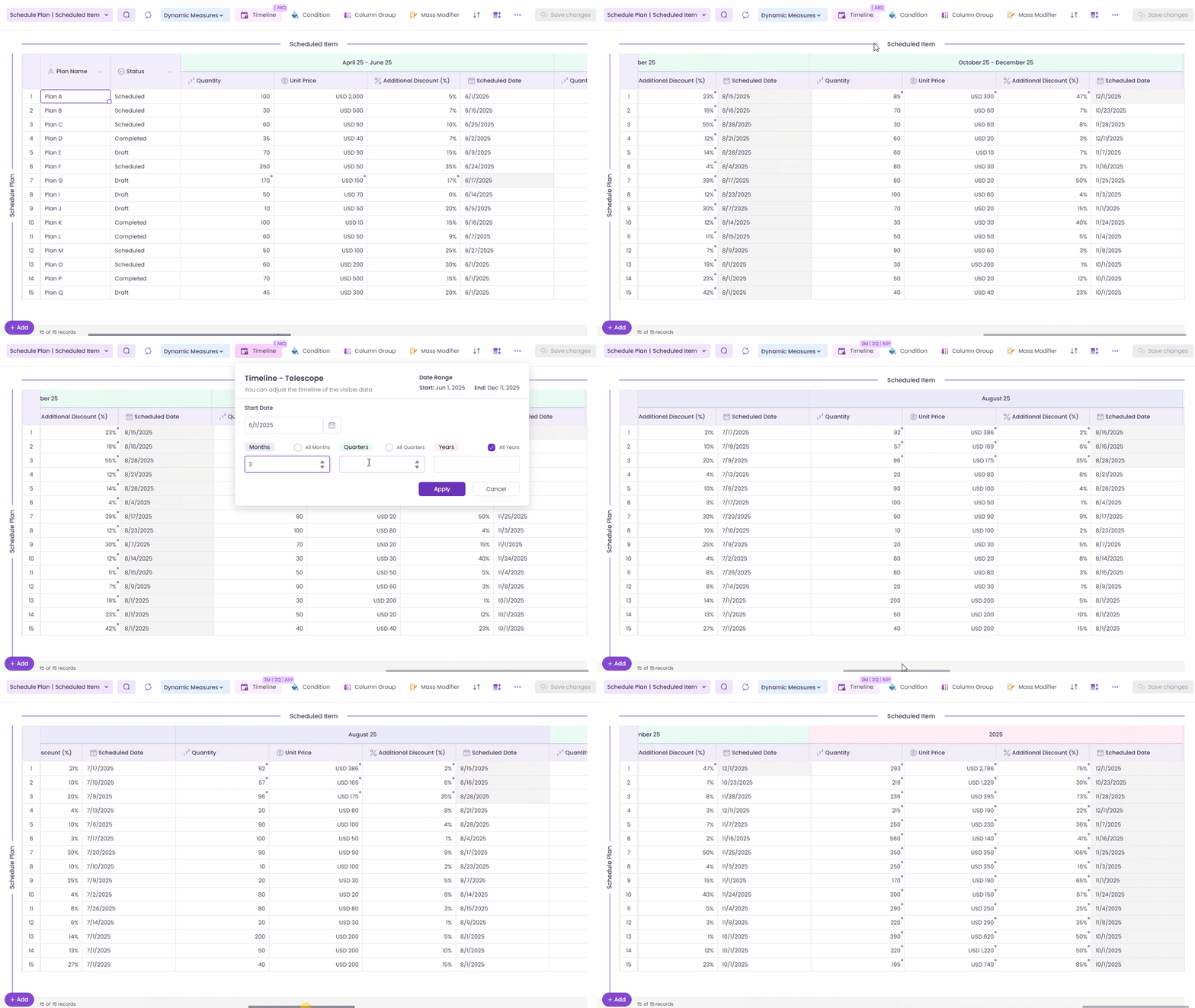
Wave's Matrix feature enables sophisticated forecasting and planning scenarios directly in Salesforce. Create dynamic views with custom rows and columns, support up to 3 different objects in one view, and leverage telescoping capabilities to project data across time periods—daily, weekly, monthly, quarterly, or yearly. For manufacturing, sales operations, and demand planning teams, this transforms Salesforce from a static data repository into a living, collaborative forecasting tool.
Here's how you can zoom in and out from years to quarters to months for telescoping or view time intervals in a straight line format:
See errors as you work—not after you've tried to save. You can prevent import errors by catching and fixing issues in real time, reducing rework and ensuring accuracy.
Wave validates data in real-time, highlighting issues before they become problems. This prevents the frustration of batch operations that fail partway through or imports that corrupt your data. Every action runs through native Salesforce validation rules and permissions, ensuring data integrity.
Admins and designers can create global grids for business users with granular data editing controls. Define exactly which fields are viewable vs. editable for different user roles. Share standardized views across your organization while always honoring Salesforce permissions and data integrity. Standard users get exactly the interface they need—no more, no less.
Build task lists, create follow-ups, and manage activities directly within Wave. Clone repetitive tasks to ensure nothing falls through the cracks. Your to-do list lives right alongside your CRM data, eliminating context-switching between applications.
With Wave Embedded, your data never leaves Salesforce. The application maintains a two-way integration with real-time syncs, fully respecting Salesforce viewing and editing permissions, sharing rules, and validation rules. Enterprise features include role-based access controls, single sign-on (SSO), change history tracking, and full audit trails. IT and compliance teams get complete visibility and control.
Let's walk through a common scenario that every sales operations team faces: it's the end of the quarter, and you need to update close dates, stages, and amounts across dozens (or hundreds) of opportunities. In native Salesforce, this means clicking into each record one by one. With Valorx Wave Embedded, you can do it all in a single view in minutes.
Your VP of Sales needs all Q4 opportunities with close dates in December reviewed and updated before the forecast call. Specifically, you need to:
This would take hours of clicking, opening records, editing, saving, and navigating back to your list view—hoping you don't lose your place.
5-10 minutes, all within a single spreadsheet-style view.
Launch Valorx Wave Embedded from within Salesforce. Open a saved Opportunity grid. Select the Opportunity object and choose the fields you need: Opportunity Name, Account Name, Stage, Close Date, Amount, Owner, and any custom fields (like Priority or Next Steps).
Use Wave's powerful filtering to zero in on exactly the records you need:
Your grid now shows only the opportunities that need attention—no scrolling through hundreds of irrelevant records.
Set up rules to visually organize your opportunities:
Now your grid automatically highlights deals that need attention based on amount and stage—no manual sorting required.
Here's where Wave's spreadsheet power shines.
For example, to update discount rates across multiple opportunities:
10 opportunities updated in seconds. No clicking into individual records.
While you're in the grid, update other fields just as easily:
Before committing, Wave shows you exactly what's changed:
When you're ready, click Save. All changes sync to Salesforce instantly—with full audit trail captured.
What would have taken 2-3 hours in native Salesforce is done in under 10 minutes:
All changes tracked and auditable. Your forecast is clean, your VP has accurate data for the call, and you didn't spend half your day clicking through Salesforce.
| Feature | GridBuddy Connect | Valorx Wave Embedded |
|---|---|---|
| 100% Salesforce native (managed package) | ✓ | ✓ |
| Multi-object grids | ✓ | ✓ |
| Inline/bulk editing | ✓ | ✓ |
| Unlimited record editing | ✗ | ✓ |
| Conditional formatting | ✓ | ✓ |
| Real-time error validation | ✗ | ✓ |
| Editable Salesforce reports (2-way sync) | ✗ | ✓ |
| Bypass 2,000 record report limit | ✗ | ✓ |
| Matrix views for forecasting | ✗ | ✓ |
| Telescoping (time-based projections) | ✗ | ✓ |
| Global search across all grid data | ✓ | ✓ |
| Activity/task management | ✗ | ✓ |
| Shareable grids | ✓ | ✓ |
| Role-based access controls | ✓ | ✓ |
| SSO support | ✓ | ✓ |
| Change history/audit trail | ✗ | ✓ |
| Data never leaves Salesforce | ✓ | ✓ |
| Free trial available | ✓ | ✓ |
| Plan details | GridBuddy Connect | Valorx Wave Pro |
|---|---|---|
| Price per user/month | ~$24 | $20 |
| Free trial | Yes | Yes |
| Record updates | Limited | Unlimited |
| Smart Import | Unlimited | Unlimited |
| Custom objects | Varies by plan | Unlimited |
| Salesforce instances | Varies by plan | Unlimited |
| Support | Email, Knowledge Base | Chat, Email, Phone |
Switching from GridBuddy to Valorx Wave Embedded is straightforward, with minimal disruption to your team's workflow:
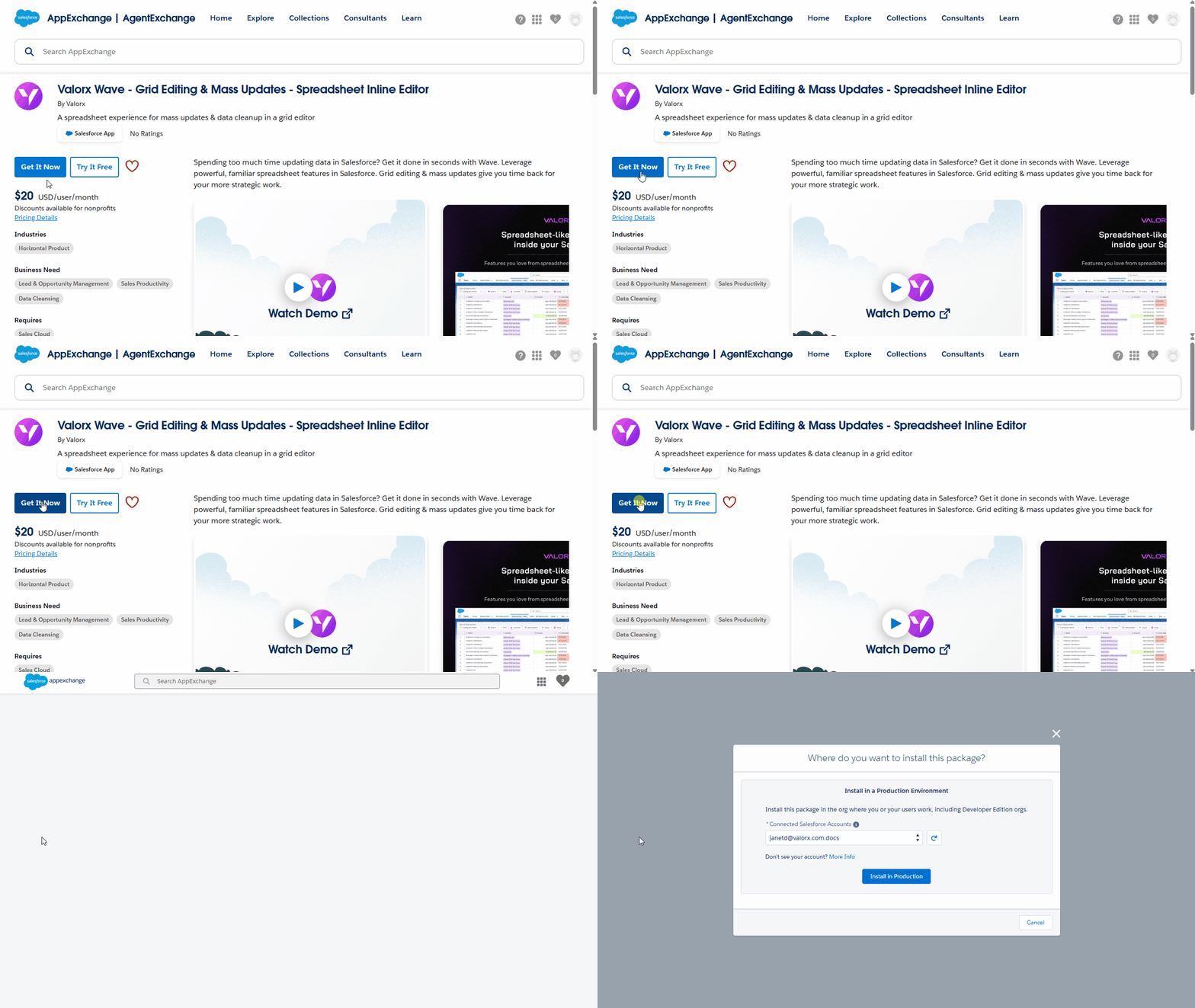
Install Valorx Wave Embedded directly from Salesforce AppExchange. The managed package installs into your Salesforce org in minutes, with no complex configuration required. Start with a sandbox environment to explore the interface and capabilities risk-free.
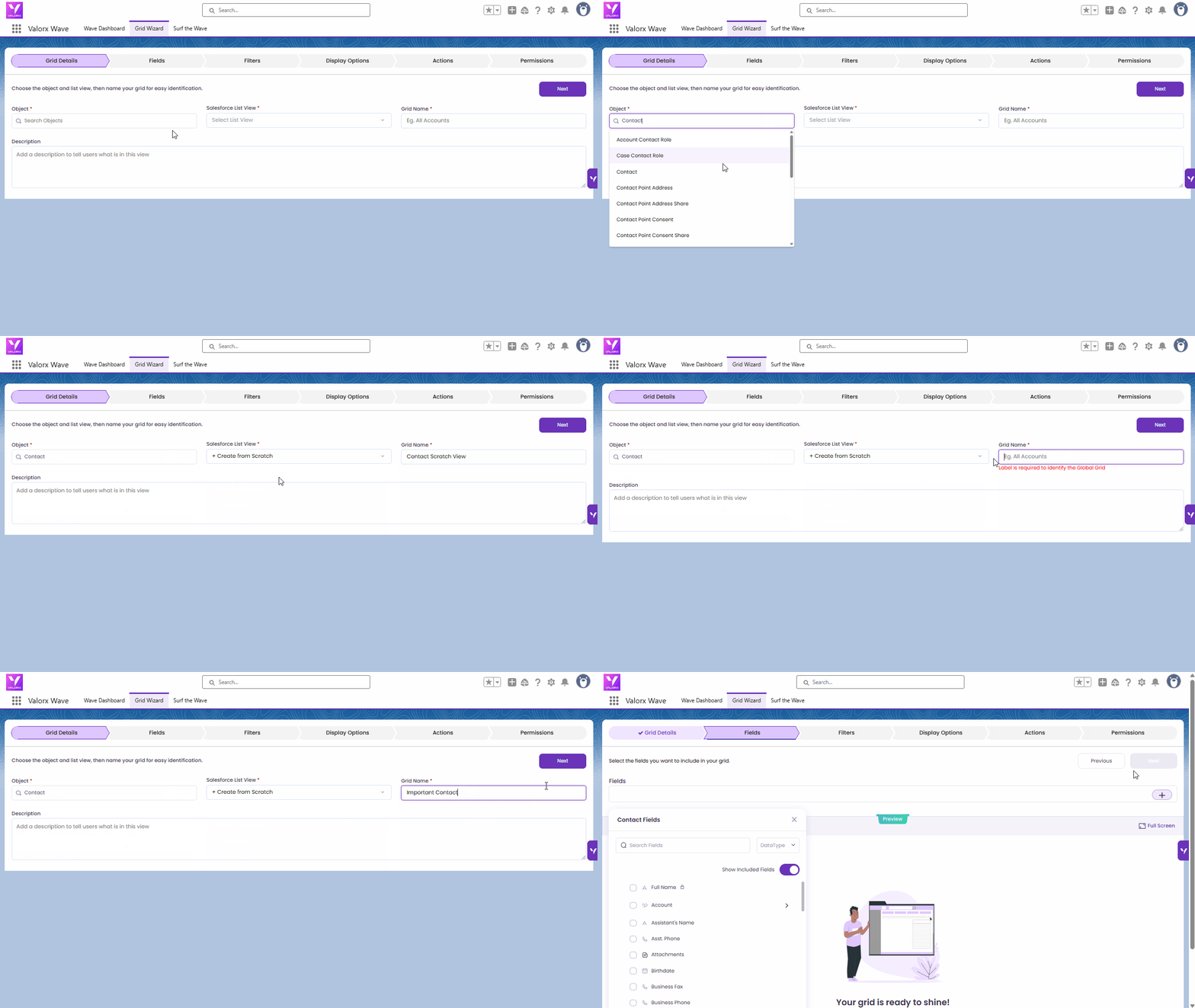
Wave's intuitive grid builder makes it easy to recreate the views your team relies on. Start with your most-used grids and expand from there.
Many teams find Wave's additional features—like editable reports and Smart Import—unlock new productivity gains immediately. You can also start from existing Salesforce reports and make them editable instantly.
Use Wave's admin controls to create standardized global grids for different user roles. Set granular permissions for who can view vs. edit specific fields. Roll out governed, consistent data views across your organization while respecting existing Salesforce security settings.
Valorx provides responsive support to help with migration questions and enterprise deployment. Wave Pro users get chat, email, and phone support to ensure a smooth transition. The Valorx team can also assist with custom configurations and best practices for your specific use cases.
Compress days of work into hours with bulk editing and real-time validation.
Say goodbye to Data Loader errors. Smart Import handles it all.
Matrix views eliminate spreadsheets and keep forecasts in sync.
Manage complex data relationships without leaving Salesforce.
Save hours weekly on routine data tasks with spreadsheet-style efficiency.
GridBuddy has served Salesforce teams well, and for organizations heavily invested in Microsoft Dynamics 365 or Zendesk alongside Salesforce, its multi-CRM capabilities remain a differentiator.
However, for Salesforce-focused teams prioritizing:
Valorx Wave Embedded emerges as the clear choice.
The free trial makes it easy to evaluate Wave alongside your existing GridBuddy installation. Deploy to a sandbox, recreate your key grids, and let your team experience the difference firsthand before making any commitment.
Ready to experience a better way to work with Salesforce data? Install from AppExchange to start your free trial or contact our team to learn more.

Yes. Wave Embedded is a managed package that installs directly into your Salesforce org via AppExchange. Your data never leaves Salesforce, all operations respect native permissions and validation rules, and IT maintains full visibility and control.
Absolutely. Many teams install Wave Embedded in a sandbox alongside their production GridBuddy deployment. This lets you evaluate the experience, recreate key grids, and train users before making any changes to your production environment.
Yes. Wave Embedded fully respects Salesforce's security model, including object and field-level permissions, sharing rules, and validation rules. Your data governance stays intact—Wave enhances the user experience without bypassing your controls.
Most teams can be up and running with Wave Embedded within days. Installing the managed package takes minutes. Recreating primary grids is typically straightforward, and Wave's intuitive interface means minimal training is required. Enterprise deployments with complex requirements may take longer, but Valorx support is available to assist throughout the process.
Valorx Wave Embedded is purpose-built for Salesforce. If you need multi-CRM support across Salesforce, Dynamics 365, and Zendesk simultaneously, please get in touch with us.
Wave Pro users receive chat, email, and phone support. Valorx is known for responsive, hands-on assistance—whether you need help with migration planning, grid configuration, or troubleshooting. Enterprise customers can also access dedicated support resources and custom implementation assistance.
Web-based CRM-Connectivity
Create a Valorx account and enjoy using Wave for free.