Sales Ops
Compress days of work into hours with bulk editing and real-time validation.


Looking for a Conga Grid alternative? Whether you're hitting performance limits at 500 records, frustrated with timeout errors during critical updates, or simply want Excel-grade power inside Salesforce—this comprehensive comparison guide will help you make the right choice.
For Salesforce operations leaders evaluating Conga Grid alternatives and modern Salesforce grid solutions, here are the headline insights that matter:
For Salesforce-focused organizations managing high-volume data operations, Valorx Wave delivers superior performance, advanced capabilities, and measurable productivity gains—without the timeout errors and record limits that frustrate Conga Grid users.
Conga Grid is part of the broader Conga product suite, which includes Composer, Orchestrate, and CLM. For Salesforce teams already invested in the Conga ecosystem, Grid offers a familiar interface for bulk data editing with spreadsheet-style functionality.
The tool provides basic inline editing and conditional formatting, making it suitable for teams with moderate data volumes and straightforward workflows. Its Multi-Tabular Related Lists feature allows users to work with different objects in separate tabs within the same interface.
Despite Conga Grid's presence in the market, a growing number of Salesforce teams are actively evaluating Conga Grid alternatives. Here's why:
Conga Grid's own documentation recommends reducing queries to 500 records when performance becomes an issue. For teams managing thousands of records daily, this creates constant friction and forces reliance on Excel exports—defeating the purpose of a Salesforce grid tool.
Teams regularly working with 1,000+ records experience slowdowns, timeouts, and failed operations. The ~500 record per page recommendation means large datasets require pagination workarounds that kill productivity.
Today's Salesforce power users expect features like:
Conga Grid lacks all of these capabilities.
When you factor in the hidden costs of timeout errors, workaround time, and productivity loss, Conga Grid's total cost of ownership becomes difficult to justify—especially when alternatives offer more capability at competitive pricing.
In practice, many Salesforce teams that have moved away from Conga Grid describe a consistent pattern of operational pain.
See what customers are saying—G2 reviews tell the story:
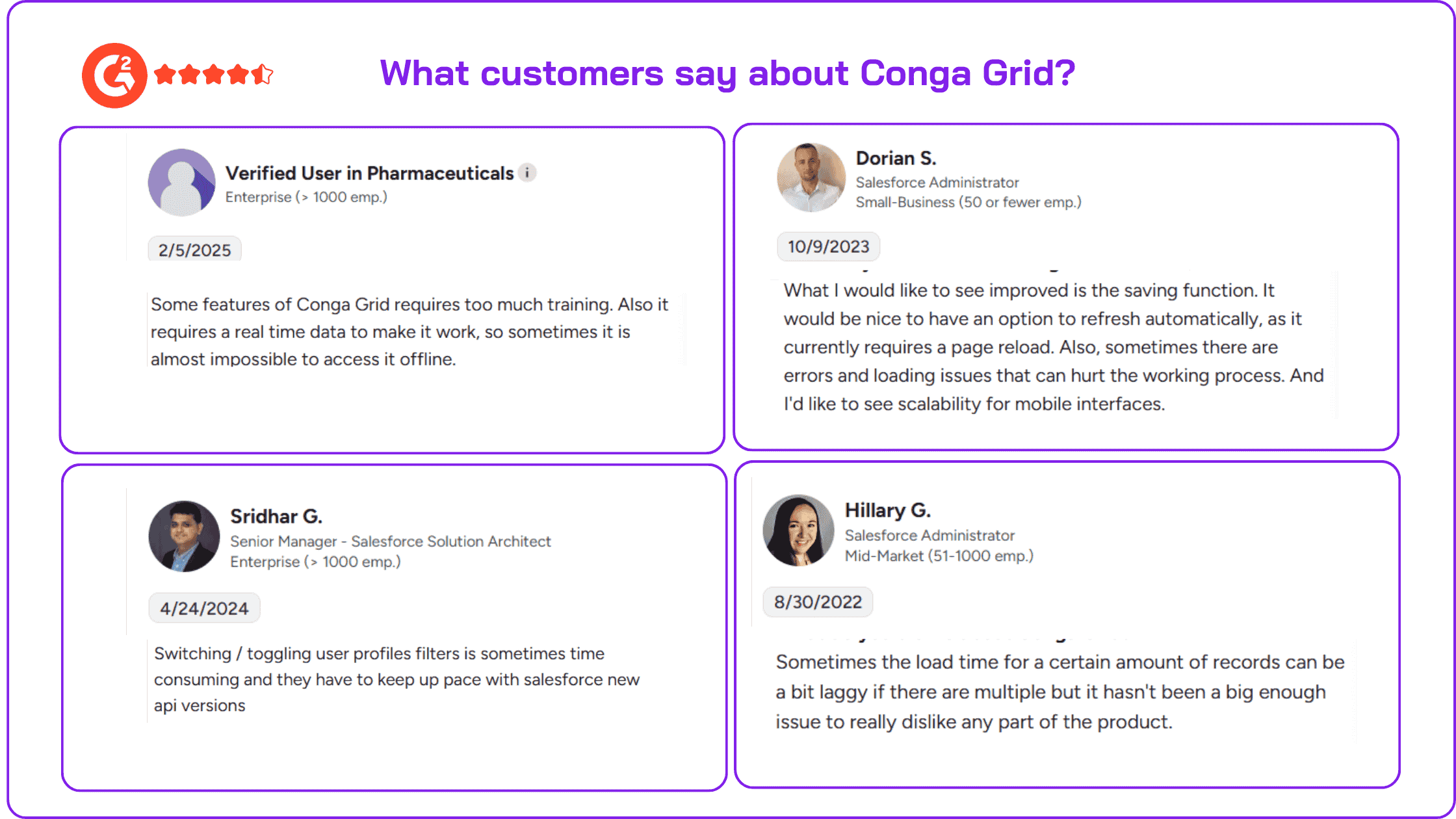
For teams managing thousands of records per cycle, timeout errors compound into measurable business cost —often exceeding $30,000 annually in lost productivity alone from timeout errors, rework, and Excel workarounds. (See detailed ROI analysis below.)
Organizations outgrowing Conga Grid face a dual challenge: the tool lacks the modern capabilities needed for evolving workflows (pre-save validation, matrix views, multi-object grids), while simultaneously delivering unreliable performance when managing large-scale data operations. Together, these factors create both strategic risk (investing in a limiting platform) and tactical risk (depending on a tool that times out during critical processes).
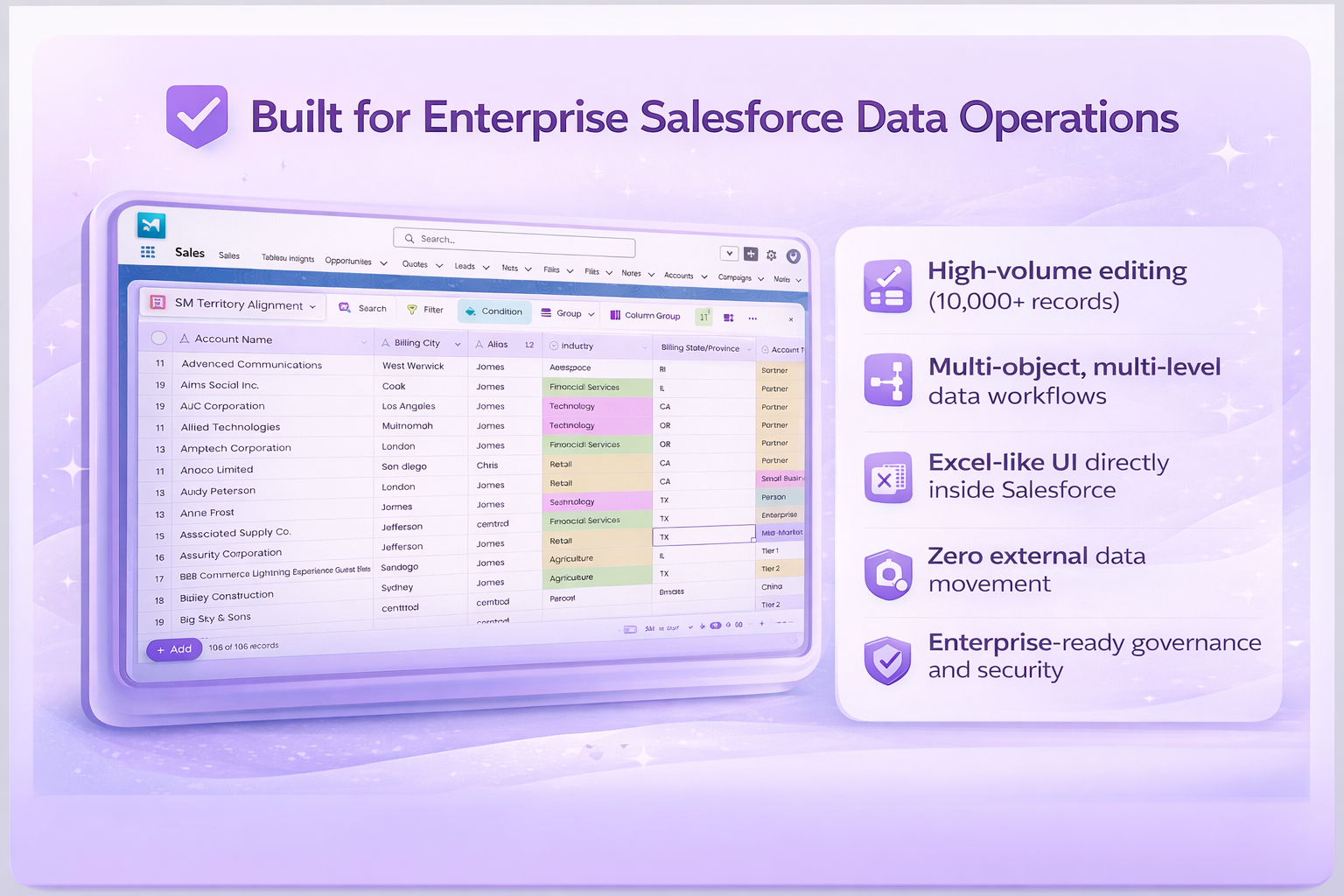
Valorx Wave represents the next evolution in Salesforce data productivity tools. As a Salesforce-native application available on AppExchange, Wave delivers a familiar spreadsheet experience with capabilities that go far beyond basic grid functionality—all within your Salesforce environment.
Unlike tools that struggle at 500 records, Wave handles 10,000+ records efficiently, making complex, multi-object workflows fast and smooth.
Valorx Wave is trusted by enterprise organizations including Scoop, Qualcomm, Capital One, Toast, Wolters Kluwer, GE Healthcare, Experian, Columbia University, and School Specialty—demonstrating its ability to scale across diverse industries and complex use cases.

| Capability | Conga Grid | Valorx Wave |
|---|---|---|
| Core Editing | ||
| Bulk/inline editing | ✓ | ✓ |
| Conditional formatting | ✓ | ✓ |
| Drag-and-fill editing | ✗ | ✓ |
| Copy/paste across rows | Limited | ✓ |
| Mass modifier tool | ✗ | ✓ |
| Performance & Scale | ||
| Recommended record volume | ~500/page | 10,000+ |
| Mass update large batch (>1000) | Disabled by default | ✓ |
| Multi-Object Handling | ||
| Multi-object views | Tabs only | ✓ Single grid |
| Advanced Features | ||
| Pivot tables inside Salesforce | ✗ | ✓ (add-on) |
| Telescoping (time-based forecasting) | ✗ | ✓ |
| Editable Salesforce reports | ✗ | ✓ |
| Bypass 2,000 record report limit | ✗ | ✓ |
| Pre-save error validation | ✗ | ✓ |
| Row Actions (trigger Screen Flows/LWC) | ✗ | ✓ |
| Import & Data Management | ||
| Smart import with preview | ✗ | ✓ |
| Saved field mappings | ✗ | ✓ |
| Real-time data validation | Post-save only | ✓ Pre-save |
| Collaboration | ||
| Live grid (teammate notifications) | ✓ | Real-time sync |
| Shareable/global grids | ✓ | ✓ |
| Integrations | ||
| Conga suite (Composer, Batch, CLM) | ✓ Native | ✗ |
| Browser extension option | ✗ | ✓ Chrome/Edge |
| Templates & Onboarding | ||
| Quick start / pre-built templates | ✓ | ✓ |
| Enterprise & Security | ||
| Salesforce-native security | ✓ | ✓ |
| Role-based access controls | ✓ | ✓ |
| SSO support | ✓ | ✓ |
| Change history/audit trail | ✗ | ✓ |
| Data never leaves Salesforce | ✓ | ✓ |
| Availability | ||
| Free trial | ✓ | ✓ |
| Free tier | ✗ | ✓ Browser extension |
While functionality determines what a tool can accomplish, user experience determines how easily your teams can leverage it. Let's see how Conga Grid and Valorx Wave stack up across key dimensions.
Conga Grid: Designed for smaller teams, Conga Grid offers a basic grid interface that simplifies bulk updates. While suitable for low-volume tasks, it struggles with high-volume data and lacks features like advanced workflows and multi-object views.
Valorx Wave: Built for enterprise-scale challenges, Valorx Wave transforms Salesforce into a spreadsheet-like powerhouse. It integrates Excel-inspired tools - such as drag-and-drop editing, real-time updates, and multi-object views - enabling teams to process complex, high-volume data effortlessly.
Valorx Wave also offers advanced data entry functionalities, including copy, paste, and clone actions, streamlining repetitive tasks and minimizing manual effort. It supports customizable controls tailored to different data types, such as dropdowns for selections, date pickers for scheduling, and formula fields for calculations. These features bring the familiarity and efficiency of Excel directly into Salesforce, empowering teams to handle intricate data workflows with ease and precision.
Conga Grid: While an improvement over standard Salesforce views, Conga Grid's interface can feel rigid for complex workflows. Features like the Reading Pane and Live Grid add collaboration value, but the Multi-Tabular approach for related objects means constant tab-switching.
Valorx Wave: Wave's Excel-like design minimizes the learning curve and accelerates adoption. Teams can fully customize views, apply conditional formatting, and work with multiple objects in a single unified grid—no tab-switching required. The familiar spreadsheet interface means most users adapt in 30-60 minutes.
Performance is critical when managing high volumes of Salesforce data.
Conga Grid: Performance deteriorates when handling hundreds or thousands of records, often resulting in slowdowns and timeouts that disrupt productivity. The Mass Update Large Batch feature exists but is disabled by default, and documentation recommends limiting queries to 500 records.
Valorx Wave: Handle thousands of records efficiently, making complex, multi-object workflows fast and smooth. Key productivity features include Mass Modifier for quick bulk edits and robust data validation that previews changes before saving to prevent errors. The grid can be embedded in various Salesforce pages and displays related records dynamically, allowing direct in-grid edits without switching tabs.
Additional features like Row Actions enable users to trigger logic, update records, and embed components directly within the grid. Supporting Screen Flow, Aura, and LWC, Valorx Wave enhances integration and usability for a seamless experience.
Conga Grid: Adheres to Salesforce’s security standards, including user permissions and validation rules, but allows users to export data offline, increasing the potential for compliance risks if not handled properly.
Valorx Wave: Follows Salesforce's robust security protocols but offers in-app controls, configurable views, and validation steps to support enhanced governance while working within Salesforce. However, like most tools, it allows for offline exports when needed.
Both tools respect Salesforce validation rules, but Wave shows you errors before you save (with red highlights and previews), while Conga Grid shows errors after you attempt to save. For high-stakes data like financials, Wave's pre-save validation helps catch mistakes before they enter your system.
Conga Grid: Conga provides regular updates and customer support resources, though user feedback on support experiences may vary depending on individual cases and service tiers. The tool benefits from being part of the larger Conga ecosystem.
Valorx Wave: Delivers frequent updates with new features and performance enhancements to keep pace with enterprise demands. AI-powered features were announced at Dreamforce 2025, including intelligent workflows for forecasting accuracy and error prevention. Wave Pro users receive chat, email, and phone support.
While upfront costs often drive decisions, the true cost of inefficiency, errors, and lost productivity can far outweigh initial investments.
Conga Grid: Despite its basic feature set, Conga Grid comes with a relatively high upfront cost. Additionally, limitations in performance, manual inefficiencies, and lack of scalability can lead to increased long-term expenses.
Valorx Wave: Priced competitively at $20/user/month, Wave offers significant ROI through faster workflows, reduced manual workloads, and error elimination, making it a cost-effective choice for high-volume organizations. A free browser extension is also available for lighter use cases.
License price tells you what you'll pay. It doesn't tell you what you'll lose.
Conga's own documentation recommends reducing queries to 500 records when performance becomes an issue. For teams managing thousands of records, this creates daily friction.
Here's what timeout errors actually cost:
| Factor | Calculation |
|---|---|
| Timeouts per user/day | 2 (conservative) |
| Recovery time per timeout | 5 minutes |
| Team size | 15 users |
| Daily lost time | 150 minutes |
| Annual lost time (250 workdays) | 625 hours |
| Fully-loaded cost @ $50/hr | $31,250 / year |
That's $31,000+ annually—before counting the frustration, the workarounds, and the data exported to Excel that now lives outside Salesforce.
| Factor | Annual Impact |
|---|---|
| License difference (Wave vs. Conga) | +$360 (Wave slightly higher) |
| Time saved from eliminated timeouts | -$31,250 |
| Time saved from Smart Import (no failed imports) | -$5,000 |
| Forecasting capability (Matrix—previously impossible) | Operational value |
| Net annual benefit | ~$35,890 |
*The license comparison is a rounding figure. The productivity difference is the real number.
Wave consolidates related objects in one unified view. No tab-switching, no context loss. Edit Opportunities, Contacts, and custom objects together—something Conga Grid's Multi-Tabular approach simply can't match.
See errors highlighted in red before you commit changes. Wave validates in real-time, preventing the batch failures and rework that plague Conga Grid's post-save error approach.
Transform any Salesforce report into an editable grid with 2-way sync. Add fields, bring in related objects, edit inline, and save—bypassing the 2,000 record limit. Conga Grid doesn't offer this.
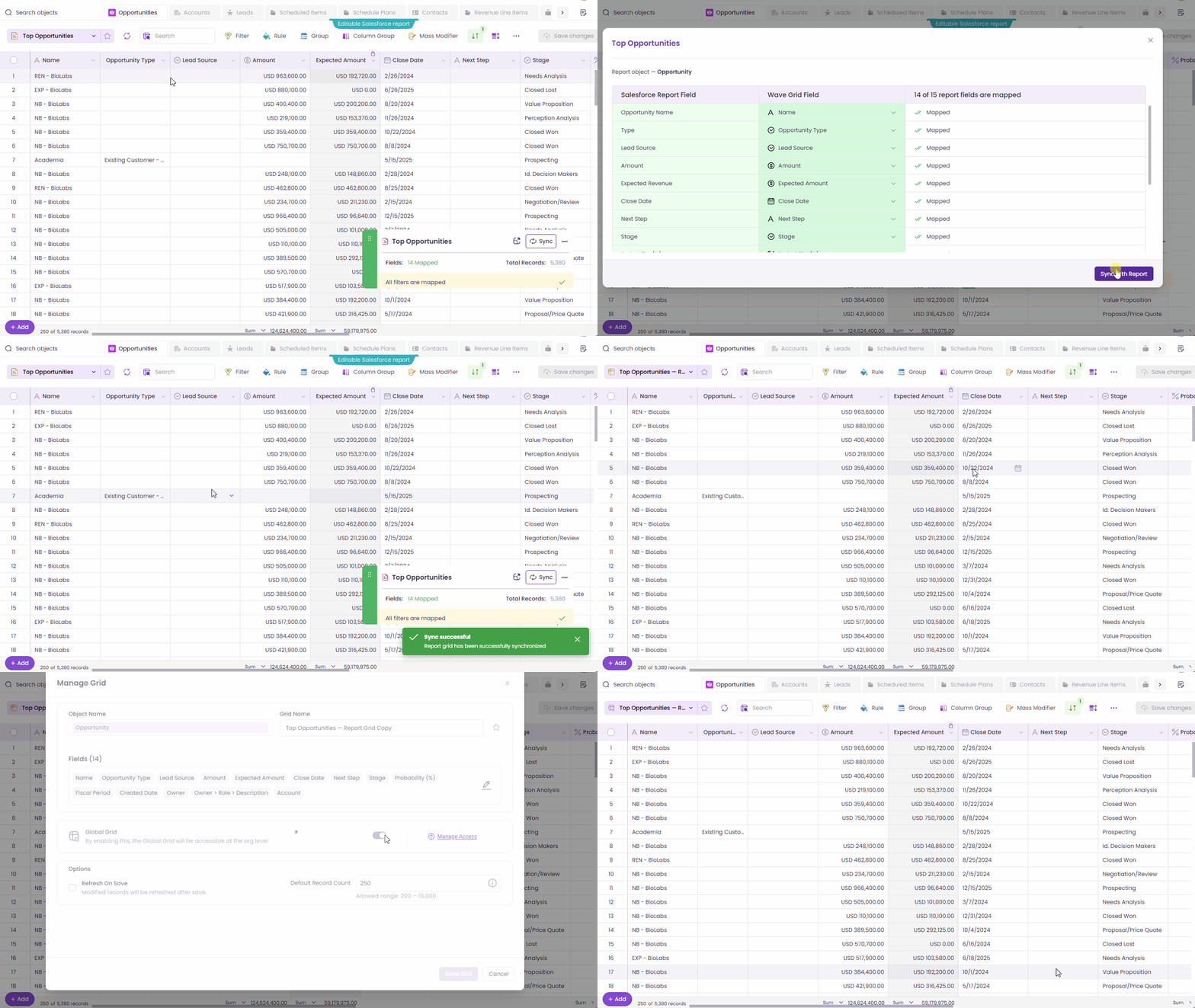
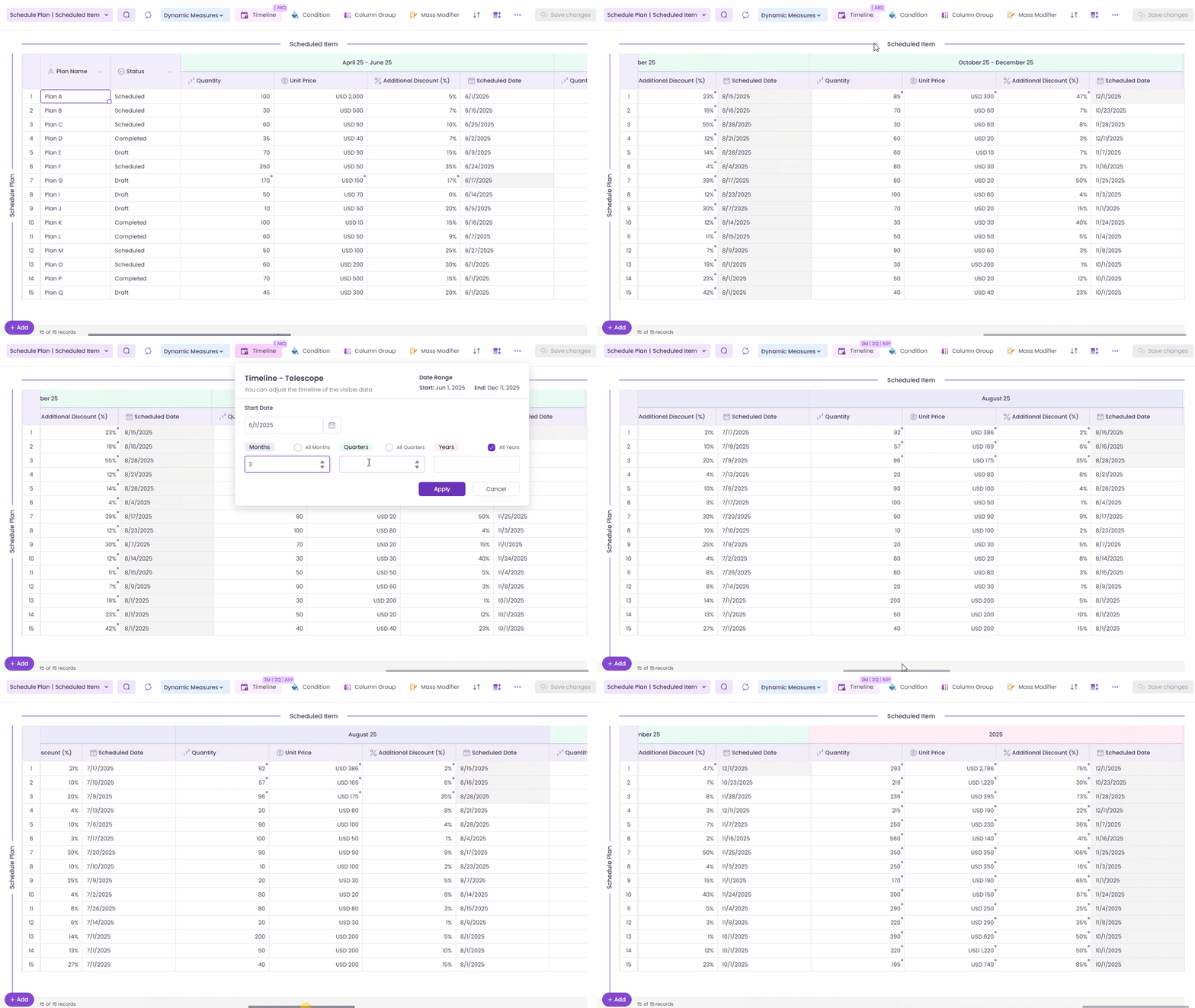
Create dynamic forecasting views with custom rows and columns, supporting up to 3 objects. Leverage telescoping to project data across daily, weekly, monthly, quarterly, or yearly intervals. This transforms Salesforce into a living forecasting tool—capability that doesn't exist in Conga Grid.
Execute Screen Flows, Aura components, or LWC directly from grid rows. Update records and trigger business logic without leaving the interface. Conga Grid offers no equivalent automation capability.
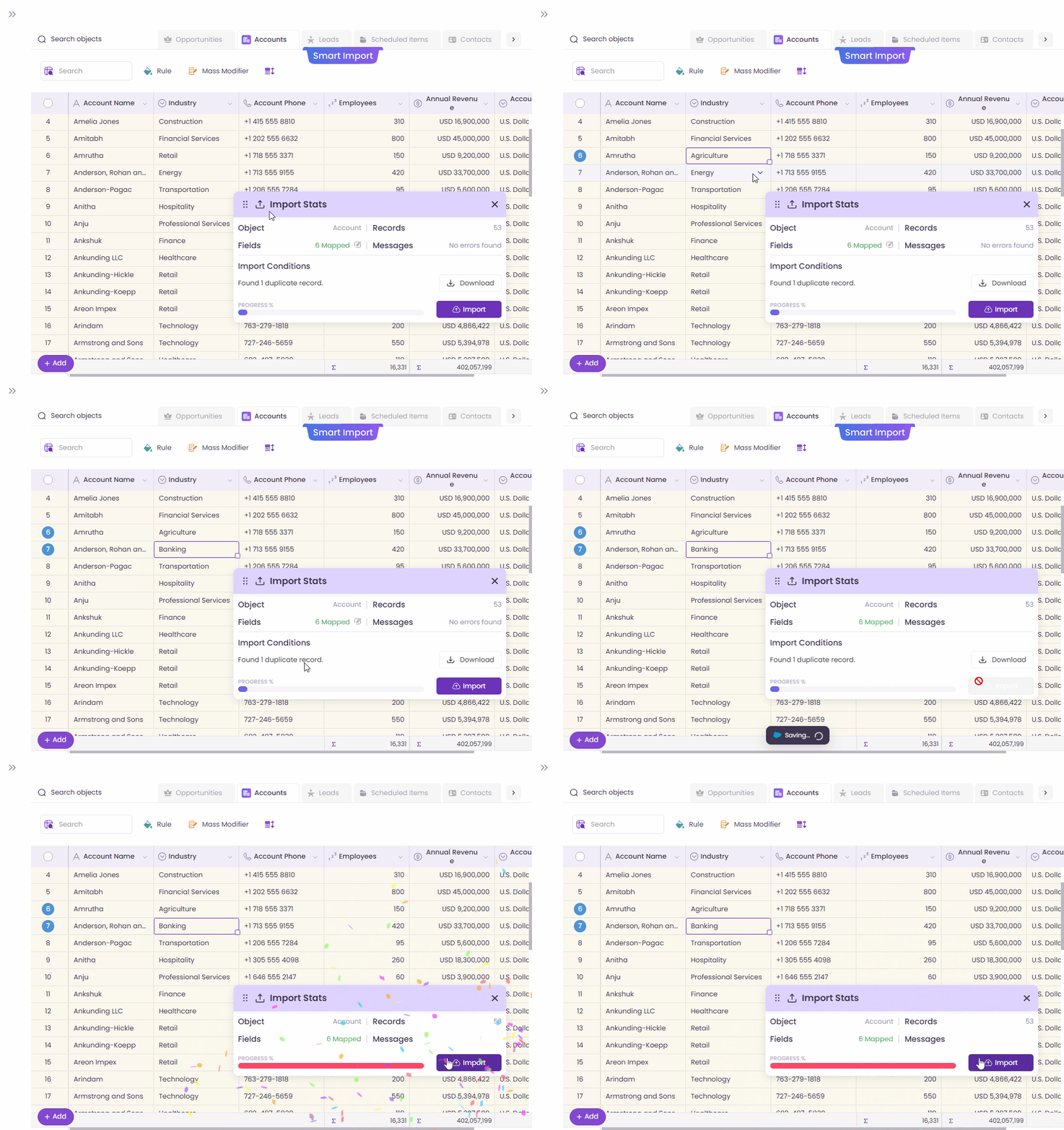
Preview and validate imports before committing. Auto-mapping and error highlighting eliminate the failed import cycles that waste hours with traditional approaches. Save your field mappings for future imports—no need to remap each time.
Change history tracking, full audit trails, role-based access controls, and SSO support. Your data never leaves Salesforce, and IT maintains complete visibility.
Concerned about migration complexity? Here's the reality:
Wave reads your existing Salesforce data. Your records don't move. Nothing to export, nothing to import, nothing to break. Day one, Wave sees exactly what Conga Grid saw.
Install from AppExchange. Configure your views. Most teams are productive within days—not weeks or months.
Wave respects profiles, sharing rules, permission sets, and field-level security. Your governance model doesn't change. Users see and edit only what their Salesforce permissions allow.
Expect 1-2 hours to rebuild your primary grid configurations. Wave's interface is intuitive—if your team knows Excel, they'll adapt quickly (typically 30-60 minutes of orientation).
| Phase | Timeline | Actions |
|---|---|---|
| 1. Evaluate | Week 1 | Install Wave in sandbox. Recreate your top 3 Conga Grid views. Test with real data volume. |
| 2. Parallel run | Weeks 2–3 | Run both tools side-by-side in production. Let power users compare performance. |
| 3. Train & switch | Week 4 | Brief team orientation (30–60 min). Sunset Conga Grid. |
| 4. Optimize | Ongoing | Build views you couldn’t create before—multi-object, conditional formatting, Matrix. |
Total transition time: Most teams complete the switch in 2-4 weeks with zero data risk.
Compress days of work into hours with bulk editing and real-time validation.
Say goodbye to Data Loader errors. Smart Import handles it all.
Matrix views eliminate spreadsheets and keep forecasts in sync.
Manage complex data relationships without leaving Salesforce.
Save hours weekly on routine data tasks with spreadsheet-style efficiency.
The choice between Conga Grid and Valorx Wave for Salesforce data management depends on your organization's scale, complexity, and growth goals.
Bottom line: If your team has outgrown basic bulk editing and needs Excel-grade power inside Salesforce, Wave was built for you.
For Salesforce-focused teams prioritizing high-performance architecture, pre-save validation, advanced capabilities (Matrix, Row Actions, Editable Reports), and lower total cost of ownership when factoring productivity gains—Valorx Wave emerges as the clear choice.
For business leaders seeking a long-term, strategic advantage in Salesforce data management, Valorx Wave delivers on its promise to streamline operations without compromise—maximizing ROI, driving team productivity, and future-proofing your business.
Ready to experience a better way to work with Salesforce data? Install from AppExchange to start your free trial or contact our team to learn more.

Technically yes, but it's not recommended. You'd pay for two overlapping solutions and confuse your team about which tool to use. Most organizations pick one as their standard data management tool. However, for comparative evaluation, many teams install Wave in a sandbox alongside their production Conga Grid deployment. This lets teams evaluate the experience, recreate key grids, and train users before making any changes to your production environment.
Nothing—your Salesforce data stays exactly where it is. Both tools work directly in Salesforce without moving or storing data externally. You'll just need to recreate saved views (1-2 hours) and train users on the new interface (30-60 minutes). Consider running both tools in parallel for 2-4 weeks during transition.
Yes. Wave fully respects Salesforce's security model, including object and field-level permissions, sharing rules, and validation rules. Your data governance stays intact—Wave enhances the user experience without bypassing your controls.
Most teams can be up and running with Valorx Wave within days. Installing the managed package takes minutes. Recreating primary grids is typically straightforward, and Wave's intuitive interface means minimal training is required. Enterprise deployments with complex requirements may take longer, but Valorx support is available to assist throughout the process.
Valorx Wave is purpose-built for Salesforce. If you need multi-CRM support across Salesforce, Dynamics 365, and Zendesk simultaneously, please get in touch with us.
Wave Pro users receive chat, email, and phone support. Valorx is known for responsive, hands-on assistance—whether you need help with migration planning, grid configuration, or troubleshooting. Enterprise customers can also access dedicated support resources and custom implementation assistance.
Because it brings Excel-grade power inside Salesforce, supports high-volume workflows, enables multi-object editing, and keeps everything aligned to governance and security standards — all at a lower cost. Check pricing here.
Wave is Salesforce-native and doesn't have native integration with Conga's document generation suite. If deep Conga ecosystem integration is critical for your workflow, that's a consideration. However, most teams find Wave's performance and capability advantages outweigh ecosystem lock-in.
Transparency note: This comparison is provided by Valorx, the team behind Wave. While we strive for accuracy in representing both solutions, we naturally believe Wave offers superior value for enterprise teams. We encourage you to evaluate both based on your specific requirements.
Web-based CRM-Connectivity
Create a Valorx account and enjoy using Wave for free.